File Converters Property Page                                     [Options Dialog Box]


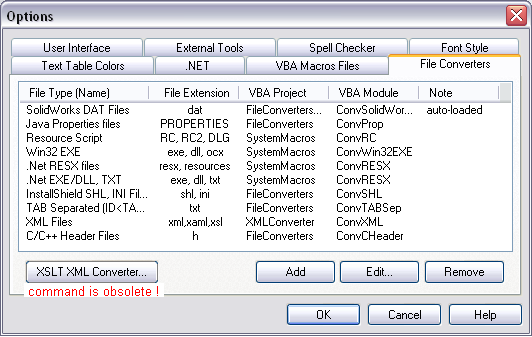
The File Converters property page lists all of the file converters available to support a certain file format (source file) to be translated with RC-WinTrans.  Initially, this property page lists all the converters supported by Schaudin.com- additional converters (VBA macros) supporting other file formats can be added.


Each entry in the Converters list (see figure below) names an available converter and its corresponding specifications.


Figure:  The File Converters property page with a number of converters listed.


Property Page Elements


·

Converters Listbox

A list of all the file converters available in RC-WinTrans that includes the following information:

–

File Type (Name)

The kinds of files supported by the listed converter.  The name can be specified by the user and is used by RC-WinTrans in "File Open" dialog boxes.

–

File Extension

The file extension(s) of the file(s) supported by the converter.

–

VBA Project

The name of the VBA project within the VBA development environment; usually has the same name as the VBA macros file.

–

VBA Module

The VBA module that implements the file converter macros.

–

Note

Additional comments about a given converter appear here.


·

Command Buttons

–

Add

Opens the File Converter Settings dialog box to add another file converter to the RC-WinTrans system.

–

Edit

Opens the File Converter Settings dialog box to edit the specifications of the selected converter.

–

Remove

Removes the selected converter from the Converters list.

–

XSLT XML Converter – OBSOLETE –

Opens theXML Files Converter dialog box.

NOTE:  This command and the usage of two XSLT files to translate XML files is obsolete as of February 2007.  The current concept for translating XML files uses a single XML parser stylesheet which does not require any initializing or registration.

See also: "XML Parser (XML File Converter)."


^ TOP ^